Product Review · By Driver Type
Mirror Dash Cams: WOLFBOX G930 Review & Who Should Buy One
4.5 / 5
Overall Rating
REDTIGER F7N Dash Cam Hardwire Kit USB C Port
The WOLFBOX G930 replaces your rearview mirror with a 10-inch display fed by a rear camera — solving blocked-rear-window problems while recording both directions. Our research-led review of who the mirror format serves.
Check PriceWe may earn a commission if you make a purchase through our links.
A mirror dash cam makes a different promise than a windshield camera. Instead of adding a recording device to your car, it replaces your rearview mirror's reflection with a live camera feed — and records both directions while doing it. For drivers whose actual mirror shows them a cargo wall, a lifted tailgate, or a back seat full of gear, that is not a gimmick; it is the fix. The WOLFBOX G930 is one of the most popular executions of the format at around $150, and this review — built from specs, owner reports, and the format's known trade-offs rather than a hands-on lab session — is about whether the mirror format, and this camera specifically, fits how you drive.
What the G930 is
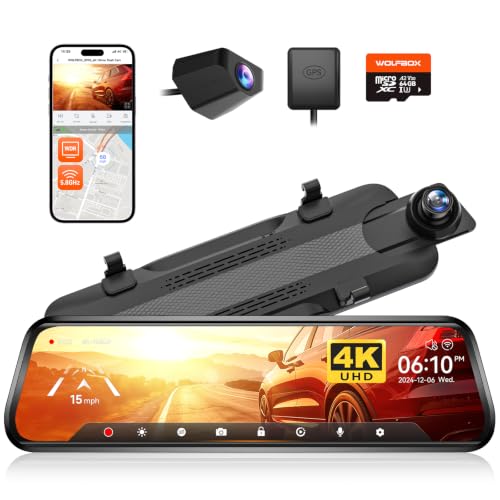
The G930 straps over your existing rearview mirror and turns the entire surface into a roughly 10-inch touchscreen. A front camera records the road in 4K-class resolution; a separate rear camera — mounted inside on the rear glass or outside near the plate — records behind the car at 1080p and feeds the mirror display. The listing advertises 5.8GHz Wi-Fi for clip transfer to your phone, and the camera stores footage on microSD like any dash cam.
Functionally you get three things in one unit: a dual-channel dash cam, a full-width digital rearview display, and a reversing aid (the rear feed with guidelines when you shift to reverse, wired via the included trigger lead).
The case for a mirror cam at all
Be clear-eyed about the format before the model. A camera feed beats a glass mirror when the glass mirror is compromised: vans and box-back SUVs with no rear glass, trucks with loaded beds, three-row vehicles stacked with luggage, dog owners with a crate across the cargo area. The camera mounts behind the obstruction, so the display shows the road you cannot see.
The trade-offs are equally structural. You are swapping an optical reflection — infinite resolution, zero lag — for a screen: a fixed focal distance your eyes must adjust to, potential glare on bright days, and a display that is always on while you drive. Some drivers adapt in a day and never look back; a minority never stop finding the screen distracting. Neither camp is wrong, and no spec sheet resolves it — if you have never driven with a digital mirror, that adaptation question is the biggest unknown in the purchase.
Hardware and recording
For around $150, the G930's recording hardware is competitive with conventional dual-channel cameras at the price: 4K-class front footage in good light, serviceable 1080p from the rear, GPS logging on the listed configuration, and parking monitoring when hardwired. Owner consensus on image quality is consistent with the class — strong daylight plates from the front camera, softer results at night, with the rear channel adequate for lane-level context and close-range plates rather than long-distance identification. That profile matches every camera we cover in this bracket; if maximum night plate legibility is the priority, a conventional flagship from our top picks list is the better tool.
The mirror-specific hardware is the point. The display is large, bright, and adjustable — you can tune the rear camera's angle digitally, zoom the feed, and dim the screen. The touchscreen handles settings without a phone, and the 5.8GHz Wi-Fi transfer is faster than the 2.4GHz-only transfer on older mirror cams when you do pull clips to a phone.
Installation notes
Mirror cams demand more installation honesty than suction-mount cameras. The strap-over mount itself takes minutes, but the rear camera run is the real project: routing cable from the mirror, along the headliner, to the rear glass or license plate area — plus the reverse-trigger wire to a reversing-light circuit if you want automatic backup view. Interior rear-glass mounting is the easy path; exterior plate mounting gives a cleaner view (no rear-window tint or defroster lines) at the cost of a through-firewall grommet run and weather exposure.
Plan on an hour-plus for a tidy interior install, and budget for power: loop recording runs fine off the accessory socket, but parking mode needs constant power — a USB-C hardwire kit runs about $26 and keeps the camera recording with the ignition off (check connector compatibility with your unit, or use the maker's matched kit). Storage follows the same rule as every dual-channel camera: a high-endurance microSD card sized 256GB — see our sizing guide in the storage article — because the always-on display does nothing to reduce the write load.
Living with it
Three owner-reported realities worth pricing in. First, glare: a screen where your mirror was catches sun differently than glass; the brightness adjustment handles most of it, and a small hood or repositioning handles the rest, but expect a tuning period. Second, the fixed-focus adjustment: your eyes refocus to a screen inches away showing a scene meters away — most drivers acclimate quickly, some do not. Third, polarized sunglasses can interact with the display at certain angles, a quirk shared across the mirror cam category.
None of these are G930-specific defects; they are the format's tax, paid in exchange for an unobstructed rear view no glass mirror can offer in a loaded vehicle.
Who should buy the G930 — and who shouldn't
Buy it if: your rear glass is regularly blocked (cargo, pets, passengers, no rear window at all); you want dash cam coverage and a backup-camera upgrade in one install; you drive a truck, van, or packed SUV where the mirror format solves a daily problem. At around $150 the G930 bundles capabilities that would otherwise take two devices — check the current WOLFBOX G930 price.
Skip it if: your normal mirror works fine and you mainly want evidentiary footage — a conventional dual-channel camera is simpler to install, keeps your optical mirror, and puts more of its budget into sensor quality; start with our current rankings or the budget front-and-rear roundup. Rideshare drivers should also look elsewhere — the G930 has no infrared cabin camera, and interior coverage is the channel that matters for that job (see our Uber/Lyft interior recording guide).
Verdict
The WOLFBOX G930 is a good execution of a format that is either exactly what you need or not for you at all. Judged as a dash cam alone it is competitive but not exceptional for around $150; judged as a dash cam plus a digital rearview mirror plus a reversing aid for a vehicle whose mirror view is compromised, it is one of the strongest value propositions in the category. Decide on the format first. If the answer is mirror cam, the G930 belongs on your shortlist.
FAQ
Does the WOLFBOX G930 work as a mirror when it's off? Yes — the surface is still a mirror, so with the display off you have a conventional (if slightly dimmer than factory-glass) reflection. Most owners run the display full-time, since the camera feed is the reason to buy the format.
Can the G930 record while the car is parked? Yes, with constant power. Like every dash cam, parking monitoring requires hardwiring to a fused circuit (or the maker's constant-power kit) with low-voltage protection so it cannot drain your starting battery. Off the accessory socket alone, it records only while the ignition is on.
Is a mirror dash cam legal? Mirror cams clip over the existing mirror rather than replacing it, which keeps them lawful for typical use in US states — but windshield-area device and obstruction rules vary by state, so check local regulations, and mount the rear camera where it does not obscure the driver's view.
Do you get used to the digital mirror view? Most drivers adapt within a few days; the eyes learn the refocus and the wider field of view becomes the preferred norm. A minority never fully take to it. If possible, try a digital mirror in someone else's car before committing — it is the one aspect of the purchase no review can settle for you.
No spam. Unsubscribe anytime.
Affiliate Disclosure