Best Dash Cam Accessories (2026): Fix Glare, Corrupt Footage, and Ugly Installs
Most dash cam failures have a specific fix: a CPL filter for windshield glare, a GPS module for speed-stamped evidence, a high-endurance microSD for corrupted clips, and a hardwire kit for clean installs with parking mode. What each accessory fixes — and the compatibility traps.
Most dash cam complaints have nothing to do with the camera. The video is washed out because the windshield is reflecting your dashboard into the lens. The clip from last month's fender-bender proves nothing because there's no speed or location stamped on it. The one recording you actually needed is corrupted, or was silently overwritten weeks ago. And the whole setup looks like an afterthought because a USB cable is draped across the dash into the cigarette lighter. Each has a specific fix — none of which involve replacing the camera. This guide is organized by failure mode: what breaks, which accessory fixes it, and the compatibility traps that cause returns.
The rule for buying accessories: match the fix to the failure
Accessory listings love to sell you a bundle of everything. Resist that. A CPL filter does nothing for a driver whose footage is fine but whose clips keep corrupting; a GPS module is wasted money if your camera already has GPS built into its mount. Start with the specific problem you have this week, buy the one item that addresses it, and confirm compatibility before checkout. If you're still choosing the camera itself, sort that out first — see our ranked picks — because the camera you pick determines which accessories will even fit.
Failure mode 1: washed-out, hazy footage from windshield glare
No spam. Unsubscribe anytime.
If your daytime clips look milky, or you can see a ghost of your dashboard floating over the road, the problem is reflected light. Modern cars with light-colored or glossy dash tops are the worst offenders: sunlight bounces off the dash, onto the raked windshield, and straight into the camera lens. License plates become unreadable exactly when you need them.
The fix is a circular polarizing (CPL) filter, the same optical trick photographers use to cut reflections off glass and water. It's a small polarized lens element that clips or screws over the camera's lens; you rotate it until the windshield reflection drops out. Per the published specs, the Vantrue 40mm ultra-slim CPL filter uses a 5.5mm slim aluminum rim to avoid vignetting on wide-angle lenses and carries anti-scratch, anti-fingerprint coatings. Vantrue lists it as compatible with its E1, E1 Lite, E2, E3, N2X, N4 Pro, N4 Pro S, N4S, N5S, and S1 Pro cameras.
That compatibility list is the whole story with CPL filters: they are size- and model-specific. This is a 40mm filter built for Vantrue's lens housings — it will not fit a Viofo, Garmin, or Redtiger camera, and even within a brand, older models can use a different diameter or mount style. Check your camera's model number against the filter's fitment list before you buy.
Two practical notes. First, a polarizer costs you a little light, so night footage can get slightly darker. Second, install it with the filter rotated correctly: point the camera at the reflection, turn the ring until the dashboard ghost disappears on the live view, and leave it there. An unrotated CPL is just a dimmer lens.
Failure mode 2: footage with no speed or location
A clean video of a collision is good. A clean video with a GPS-verified speed readout and coordinates is much better — it preempts the other driver's claim that you were speeding, and it ties the clip to an exact place and time for an insurance adjuster or police report. Many budget and mid-range dash cams ship without GPS to hit a price point, then offer it as a plug-in module.
The VROAVIE GPS module is that plug-in for VROAVIE cameras. Per the product documentation, it feeds the camera your location, speed in MPH or KMH, and time, and the brand's free desktop player can replay a clip alongside a live map trace of your route, with the speed data embedded in the recording rather than claimed after the fact. GPS time sync also keeps your timestamps honest when a claim hinges on who entered the intersection first.
The compatibility trap here is even stricter than with CPL filters: GPS modules are brand-specific and often model-specific. The module plugs into a proprietary port (sometimes it's built into a replacement windshield mount), and the camera's firmware has to know how to read it. A VROAVIE module works with the VROAVIE cameras it's listed for and nothing else; the same is true of every other brand's module. Before buying, check three things: that your exact model appears on the module's compatibility list, that your camera doesn't already have GPS built in (some hide it in the mount), and whether the module replaces your existing mount — if it does, plan your cable routing around the new mount's connector position.
Failure mode 3: corrupted clips and silently overwritten evidence
This is the failure that actually costs people money, because you discover it only when you go looking for footage that no longer exists. Dash cams are brutal on memory cards: loop recording rewrites the entire card continuously, hours a day, in a hot windshield environment. A standard microSD card designed for phones and photos wears out fast under that load. Symptoms: corrupt files, cameras that freeze mid-recording, and event clips that were never actually written.
The fix is a high-endurance card — cards rated for continuous-write workloads, typically with V30/U3 speed ratings and an endurance spec quoted in thousands of recording hours. A solid high-endurance microSD selection comes in the capacities most 4K cameras want. Match capacity to your camera's supported maximum and format the card in the camera, not your computer, so it gets the file system the firmware expects.
If you want a belt-and-suspenders option, the GIGASTONE 256GB high-endurance card bundles something unusual: per the published listing, it's a TLC high-endurance card rated up to 160MB/s (A2, V30, U3) that comes with five years of free data recovery service from the manufacturer. If the card fails with footage on it, you send it in and they attempt the recovery — a meaningful hedge for rideshare drivers whose footage has real dollar value. It's listed as compatible with common dash cam brands including Redtiger, Rove, Viofo, and Vantrue.
Card selection goes deeper than this — endurance ratings, capacity math against your camera's bitrate, and which cards to avoid — and we keep a dedicated roundup for it: see our microSD picks for dash cams for the full breakdown. Whatever card you buy, adopt two habits: lock or export important clips the same day an incident happens (loop recording will eventually eat everything unlocked), and format the card in-camera every month or two to keep the file table clean.
Failure mode 4: the clip is already gone
Sometimes you're past prevention — the card shows corrupt files, or a clip you needed was deleted. Recovery software is the last resort, and it works more often than people expect, with one hard limit: footage that loop recording has already overwritten is gone for good, because the actual data on those sectors has been replaced. What recovery tools can often rescue is deleted-but-not-yet-overwritten files and clips stranded by file system corruption.
The procedure matters more than the tool. The moment you suspect a problem, stop recording and pull the card — every additional minute of loop recording overwrites potential evidence. Do not format the card, even if the camera prompts you to. Put it in a USB card reader on a computer and run a scan with a tool like EaseUS data recovery, which scans the card sector-by-sector for recoverable video files and lets you preview what it finds before restoring. Recover files to your computer's drive, never back onto the card you're rescuing. If the card isn't even detected by the computer, that's a physical failure — software can't help, which is exactly the scenario the GIGASTONE recovery service above is designed for.
Treat recovery software as the fire extinguisher, not the smoke detector — the high-endurance card is what prevents the fire.
Failure mode 5: dangling cables and a dead camera when parked
A dash cam powered by a cable drooping across the dashboard has three problems: it looks terrible, the cable works loose over bumps, and the camera dies the moment you shut off the ignition — which means zero parking protection, where a large share of vandalism and hit-and-run damage happens.
The first half of the fix is a trim removal install kit: plastic pry tools and a cable-tucking wedge that let you push the power cable into the headliner gap, down the A-pillar trim, and along the door seal without marring anything or resorting to a metal screwdriver. Twenty minutes of tucking turns a dangling install into an invisible one. One caution: many A-pillars house curtain airbags, so route the cable behind the trim without wrapping it across the airbag's deployment path — under the headliner edge and along the pillar's outer channel is the standard route.
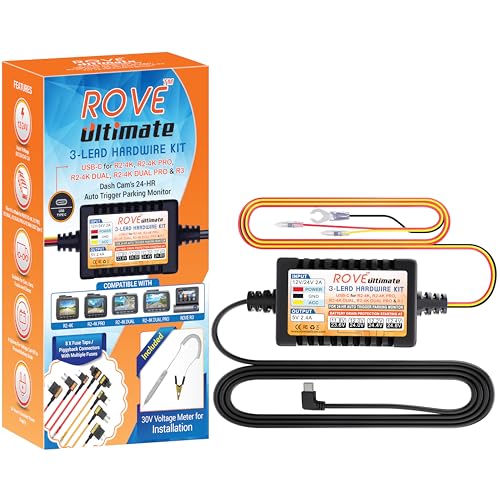
The complete fix is a hardwire kit: a cable that taps your fuse box with add-a-fuse taps, powering the camera from the car's electrical system instead of the 12V socket. That frees the socket, removes the visible cable entirely, and — the real payoff — supplies constant power so the camera's parking mode works while you're away. Good kits include a low-voltage cutoff that shuts the camera down before it can drain your battery below starting voltage, per their published specs; make sure the kit you pick matches your camera's connector (USB-C, mini-USB, or a proprietary plug) and your car's fuse type (mini, micro2, low-profile). The install is a solid beginner DIY project — we walk through the whole thing, fuse taps to parking mode settings, in our hardwire and parking mode guide.
What to buy first
If you're outfitting one camera this week, here's the priority order for most drivers. First, the memory card — a high-endurance selection, or the GIGASTONE with recovery service — because storage failure is the mistake you can't undo. Second, the hardwire kit plus trim tools if you park on the street or drive rideshare; parking mode coverage is worth more than any image tweak. Third, the CPL filter if you have a reflective dash — it's the single biggest daytime image-quality upgrade available. The GPS module slots in wherever evidence quality matters most to you. And buy from listings you can verify: accessory categories attract lookalike products, and warranty support differs by seller — our guide to buying direct versus marketplace covers how to tell what you're actually getting.
FAQ
Will a CPL filter from one brand fit another brand's dash cam?
Generally no. CPL filters are sized to a specific lens housing diameter and mount style — the Vantrue filter covered here is a 40mm design built for Vantrue's listed models (E1/E2/E3 series, N2X, N4/N5 series, S1 Pro). Even a matching diameter doesn't guarantee the attachment method fits. Always check your exact camera model against the filter's published fitment list; guessing is how these end up returned.
Does a CPL filter hurt night recording?
Somewhat. A polarizer blocks a portion of incoming light — roughly one to two stops — so night clips record a bit darker with it installed. For most drivers the daytime glare reduction is worth the trade. If you do a lot of night driving, a twist-off filter takes seconds to remove in the evening and reinstall in the morning.
Can recovery software get back footage that loop recording overwrote?
No. Once the camera writes new video over old sectors, the original data is physically gone, and no software can reconstruct it. Recovery tools rescue deleted files and clips stranded by corruption that haven't been overwritten yet. That's why the response to any incident is immediate: lock the clip in-camera or pull the card the same day, and if the card misbehaves, stop recording on it before running a scan.
Do I really need a high-endurance card, or is any name-brand microSD fine?
Dash cams rewrite the entire card continuously in a high-heat environment, which is exactly the workload standard cards aren't built for. High-endurance cards use flash and controllers rated for thousands of hours of continuous recording, per their published specs. Given that the card is where your evidence lives, it's the worst possible place to cut corners. Check your camera's maximum supported capacity before buying and format the card in-camera.
Is a hardwire kit safe for my car's battery?
Quality hardwire kits include a low-voltage cutoff that monitors your battery and shuts the camera off before voltage drops below a safe starting threshold — many let you choose the cutoff level. Installed with add-a-fuse taps on the correct circuits (one switched, one constant), a hardwire kit draws little enough in parking mode that healthy batteries handle it fine. Cars that sit unused for weeks, or with aging batteries, should set a conservative cutoff or use a dedicated battery pack instead.
Affiliate Disclosure